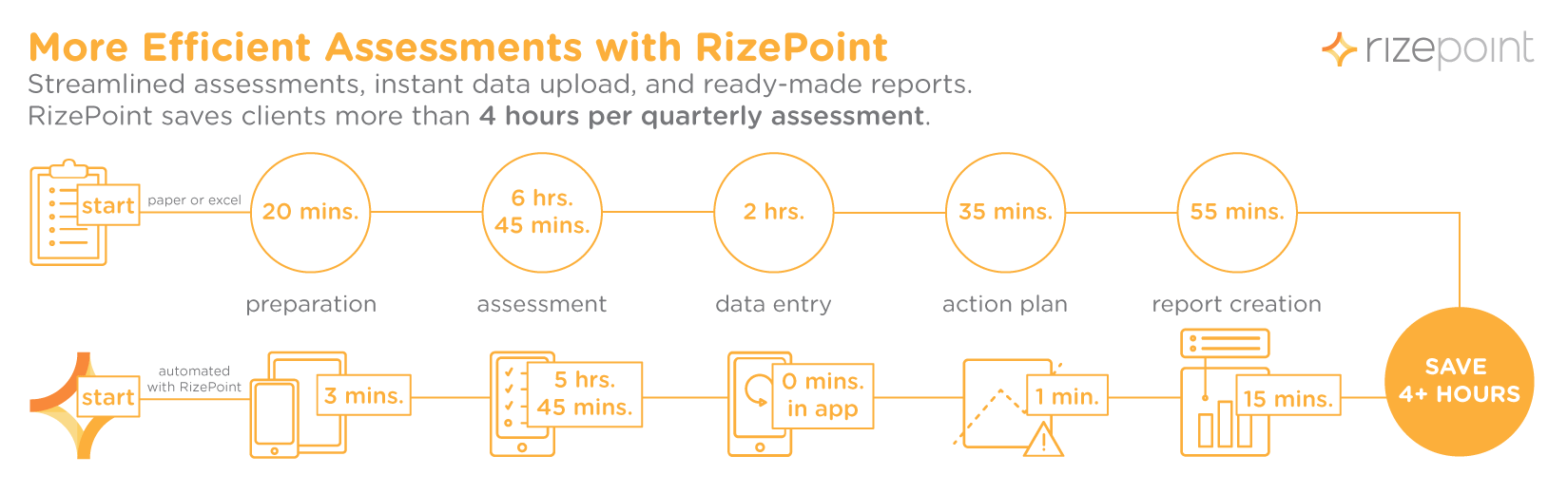
Quality management inspections — including inspections for safety, brand consistency, or regulatory compliance — are inherently time-consuming. When using traditional methods, such as pen and paper, it can take an auditor several hours to get the required information. Additionally, multiple types of audits might need to happen at varying frequencies — from quarterly to monthly to weekly — at a single location. And then on top of all that, franchised companies can have dozens if not hundreds of locations, meaning a single company can potentially be responsible for thousands upon thousands of audits per year. It may seem like using spreadsheets or pen and paper checklists would be cheaper because the upfront cost is low. But the truth is the cost of a cloud-based software more than pays for itself when you see how much time a single auditor will save on a single audit, let alone the time saved when thousands of audits are in play. Given how frequently audits need to occur, it’s easy to see how small amounts of workforce hours can quickly add up, which means that even small improvements to efficiency can have an exponential impact. Let’s look at each part of an in-depth, quarterly audit to explore how much time auditors could be saving with the right mobile auditing software.
1. Preparing to Audit
Manual: 20 mins. To start, auditors need to find and print the documents they need, open various spreadsheets, and make sure they input the correct information about the location, the type of audit, and the date and time. Often the same information needs to be on multiple documents to keep everything organized, which means a single piece of information needs to be recorded multiple times. Automated: 3 mins. Using auditing software, all the necessary auditing forms are organized in the same place. Auditors can get to the right documents with a few taps, saving a bundle of time. Additionally, all documents are linked, so information will not need to be recorded more than once.
2. Making Assessments
Manual: 6 hrs. 45 mins. Assessments are the real meat of the process, and switching between papers, clipboards, and a series of spreadsheets isn’t the quickest way to complete an audit. In addition, assessments aren’t always standard from one location to another, so understanding various exceptions (i.e. a hotel with a pool versus without) can be another time-consuming part of the process for an auditor. Automated: 5 hrs. 45 mins. With simple checklists and assessment workflows built right into the same application, the process of conducting food safety, brand standard, regulatory compliance, or other audits is much simpler and less time consuming. As for location-specific exceptions, the right quality management software allows you to waive rules and automatically skip questions that aren’t relevant to some locations.
3. Entering Data
Manual: 2 hrs. With pen-and-paper assessments, auditors have the added step of transferring data to digital spreadsheets or other organizational systems to store, review, analyze, and compare the audit results. This process that can take up to two or more hours. Automated: 0 mins. With auditing software, you input the data one time into the same system you’ll use to store, review, analyze, and compare all the data you collect, which eliminates the data entry step altogether.
4. Creating an Action Plan
Manual: 35 mins. With data compiled, it’s time to put it to use as part of an action plan. This step is traditionally a blend of wading through data in various documents and spreadsheets to find out what was out of compliance and how this compares to audits historically. Then the assessor must manually configure the steps for a compliance plan they’ll email to those responsible making improvements.
Automated: 1 min. With mobile auditing software, action plans are automatically created, so there’s no side-by-side spreadsheet shuffling. When audits are complete, the action plan is automatically sent to everyone who needs it so they can begin taking action immediately.
5. Finalizing and Creating Reports
Manual: 55 mins. With manual methods, auditors need to summarize everything discovered in an audit to share with franchise locations. It takes time to build reports that make it clear to franchise managers what’s working, what needs improvement, and what needs immediate action. Automated: 15 mins. With quality management software, you can control reporting through a simple dashboard that allows you to view out-of-compliance audit results instantly. With a few quick clicks, auditors can generate and share reports so branch locations and franchises can begin remediating issues immediately. Or you can even set automated alerts so non-compliance action plans are delivered to stakeholders without any further action from the auditor.
6. Counting Your Saved Time
Total Time Savings • 4+ hours per quarterly audit • 1000+ hours a year per auditor On average, an auditor spends 4 hours (half a day) longer than is necessary to complete a quarterly inspection. Multiply that time by how many of these audits your company completes in a year, and it’s easy to see that quality management software isn’t a pricey burden, it’s an investment that can save hundreds of hours a year for each auditor in the field.
In 1986, the NASA Shuttle Challenger exploded just minutes after take-off, killing all seven astronauts on board. An investigation found the failure of a solid rocket booster O-ring caused the explosion of the shuttle as it was leaving the Earth’s atmosphere. However, a breakdown in quality assurance and quality management was also cited as a factor in the doomed mission. Despite concerns from engineers regarding the O-ring’s performance in cold weather (it was unusually cold the day of the launch), NASA officials still ratified the launch, thus sealing the fates of the astronauts on board.
Toyota, Exxon, Apple, BP — each of these companies have been victims of poor quality management. A breakdown in quality management not only leaves a company vulnerable to liability and lost customers, but it can also have deadly consequences. In the case of BP, an explosion at its Deepwater Horizon rig in 2010 killed 11 workers and caused a catastrophic oil spill in the Gulf of Mexico. The overarching cause of the explosion was a quality management failure. The explosion and consequential oil spill remains one of the worst man-made environmental disasters in U.S. history.
These cases are extreme, but they highlight the importance of having an effective quality management plan for your business. Whether you are operating a Fortune 500 company or opening a franchise, quality management is an essential part of owning a business. Here are four reasons why you need quality management:
Ensure that your business, products, and services align with your goals and vision.
Set benchmarks to meet product expectations and requirements of your customers.
Attract and retain the confidence of customers and other stakeholders (i.e. vendors, investors).
Establish a checks and balance system to keep your employees safe at the workplace.
Quality management is more than a process — it’s a culture. As a business owner, it is important for you to reiterate the magnitude of quality management to your employees. If you are just starting your business, you should focus on four key areas when creating your quality management strategy:
Quality planning
Quality assurance
Quality control
Quality improvement
Audits, assessments, and inspections are all part of quality assurance. But how can you efficiently track all of this information? Spreadsheets and paper are options, but in reality these documents can get lost and it’s difficult and time-consuming to gather actionable data manually.
The good news is that there are existing digital tools that can help you create a thorough and successful quality management plan. Software such as RizePoint can help protect your company from issues related to quality management and safety by providing real-time information. When you create a plan, the software will use it as a guide to immediately alert you to obstacles or problems so you can act quickly. This process not only protects your company, but it also strengthens and protects your brand — the very heart and soul of your company.
More than 80% of people surveyed in a 2013 Stratecast study said they used SaaS for work that hadn’t been approved by I.T. The motive of those surveyed was not to be secretive or sneaky; they simply wanted tools to help them be more efficient and productive.
However, no matter how pure the motives may be, and no matter the increase in productivity, an app not vetted by I.T. can make companies vulnerable to a number of issues, including the following:
Malware from bogus programs
Difficulty analyzing information from several disconnected sources
Unauthorized access and dissemination of data
The solution isn’t banning employees from trying to solve workflow problems — the solution is to position I.T. as a business strategy driver so employees can work with I.T. to solve problems while protecting sensitive information.
Pros of Shadow I.T.
When employees use systems and programs inside an organization without the approval of I.T. it’s called “shadow I.T.” This may seem like a “dirty term” or a practice you want to avoid at all costs, but there are some pros when employees try to solve their own production problems.
Ralph Loura, CTO of Rodan + Fields, sees shadow I.T. as an “opportunity to leverage employees to identify the applications they want to use so that I.T. can enable the ones that have gained traction and are enterprise-ready.” In other words, when employees seek out solutions to their operational problems, they are easing part of I.T.’s burden.
Chances are the people working in your I.T. department are already researching SaaS that will facilitate collaborative processes inside your organization. But I.T. isn’t always aware of how any given SaaS will affect the day-to-day operations of a department. That’s why attacking a problem from both sides is important — it helps empower employees to solve their own workflow problems while I.T. identifies solutions that work across the company.
I.T. as a Strategy Driver for QMS
As data and processes become more sophisticated, there is no better driver to a business strategy than your existing I.T. department. Khalid Kark, managing director of the Deloitte CIO program, sees tremendous opportunities for the I.T. department as a business strategy driver. He says, “I.T. can be positioned not just as a delivery center but as a partner in the company’s new journey. I.T. has a necessarily cross-discipline, cross-functional, cross-business unit purview.”
In the context of food service, hospitality, and retail, there are several ways that I.T.-based guidance and strategies will benefit your company:
Operations and quality. An effective SaaS platform supporting quality, brand, and safety will help your operations and quality teams save time, money, and headache. The right solution will store the collective data and quickly provide real-time analytical information.
Legal and compliance. The right SaaS solution will conduct regular and thorough audits and assessments. This information will be readily available to your company’s legal team and managers. When the software identifies issues, stakeholders are immediately notified so they can resolve the issues quickly.
Marketing and branding. Brand is the heart and soul of any company. Given its significance, it is important you protect your company’s brand. Strong SaaS tools can facilitate brand management, which can help your company avoid potential PR nightmares in the future.
Overall value to the company. With careful planning, the I.T. department can identify key software tools and platforms that will fulfill the needs of multiple departments.
As you seek out SaaS programs to manage quality and operations in retail, hospitality, and food service, your technology department can help you identify a solution that will resonate with all departments.
Protecting your brand is a more fragile process than it used to be, and brand experience is more important than ever. Any poor customer experience that hits the headlines can mean huge losses to your reputation and your bottom line.
When it comes to protecting your brand, an ounce of prevention is worth a pound of cure, and your prevention solution lies within your quality and operations departments. Manual methods are slow and can’t help you identify and correct issues before they become problems. Additionally, ticking boxes may help you finish tasks, but it won’t help you sort your data to help you find ways to improve your processes and business. Investing in a Quality Management Software (QMS) starts to make a lot of sense in this context, but companies with a well-heeled I.T. department may feel outside help is unnecessary and too expensive.
You may decide to use or create something in-house, building it in a piecemeal fashion as needs arise. This may work in the short-term, but the long-term problems that come with building a custom tool can cut deeply into your bottom line. The time it takes for your I.T. department to build the tool in the first place is a factor, but the time commitment will not end after the first build. If anything breaks, I.T. has to fix it, and when your tool inevitably needs an update, I.T. will have to build it. Soon you’ll be dedicating a whole team of devs to only maintain a custom tool and deal with coding headaches. Additionally, every time your custom tool is broken, your quality and operations programs are exposed to the risks that that could poorly affect your customers, brand, and bottom line.
Why not put the burden of the technical piece of QMS in the hands of the experts? Click here to read more details about how a proven digital solution can easily solve problems and improve the processes of your quality and operations departments — you can do it all without putting a burden on the valuable hours and resources of your I.T. department.
In its inception in 1964, Arby’s banked on the idea of being a unique sandwich experience in an oversaturated burger joint market. The Raffel brothers used fast food speed to serve sliced roast beef sandwiches, perfected curly fries, and their own Horsey Sauce to “Inspire Smiles through Delicious Experiences.” Their vision and drive were clear, and the current 3,300 Arby’s franchises worldwide are the proof in the pudding.
However, in the early 2000s, sales stalled and Arby’s marketing messaging was met with mixed reception. Arby’s needed to refocus and bring several strategies together in order to reassert their unique experience within the fast-food market and to appeal to a broader customer base.
Rethinking Brand
Arby’s revitalized their brand in three key ways:
Back to Basics: The main key to their success was staying true to their roots. The brand had a loyal customer base, and Arby’s model of staying unique in a hamburger world was still valid. As they revitalized their brand, they used this lens to assess change.
Menu Upgrade: Original favorites stayed on the menu, but Arby’s also added new products like Reuben sandwiches and smokehouse brisket to tempt untapped customers and excite their fan base.
Playful Messaging: Arby’s also focused on market research and new tools to better understand customer experience and deliver playful messaging. In fact, finding a new way to track and integrate Voice of Customer (VOC) became a lynchpin to renewed success.
Integrating Voice of Customer
For over 10 years, Arby’s had used RizePoint to track front- and back-of-house for performance and food safety. Arby’s completed more than 13,000 Arby’s Operation Reviews (A.O.R) annually, and the results included continued improvement in quality, operations, and brand standards. The success of these audits was clear, but Arby’s needed a way to integrate that data into a strong VOC program.
The answer for optimizing customer experience came with InMoment, which has the ability to interface their customer experience data with RizePoint’s A.O.R data. InMoment also developed a process to integrate over 50,000 pieces of customer data with restaurant audits to deliver easy-to-understand and restaurant-specific reports that included coaching insights and suggestions for improvement. With these integrations, the Arby’s “We Make It Right” campaign was ready for action in 2016.
Enjoying Data-driven Results
When operational processes meet company expectations, customer experiences and bottom line metrics improve, and that’s what Arby’s experienced. Within eight months of the InMoment-RizePoint integration, Arby’s saw significant increases in key metrics, including a 34% increase in overall satisfaction, a 33% increase in friendliness, and a 22% increase in product quality. In fact, in 2016 Arby’s reported 3.8% growth while restaurants across the country slumped.
Click here to read the full case study for more details, insights, and results.
Risk management professionals cannot help their organizations succeed without a clear strategy to win, delight, and retain customers. Yet, too many companies remain reactive when it comes to mitigating the risks associated with customer-related experiences.
There’s a Problem
We’ve all seen it before: A customer has a negative experience with your brand, let’s say at a hotel, where they are disappointed by a hard mattress and a late check-in.
Unfortunately, in today’s age of social media, a poor customer experience doesn’t stop at the comment box and a quick rant to friends. Instead, a customer’s words can reach beyond their network. With just a few keystrokes, your brand has gone viral for all the wrong reasons.
No one likes to get beat-up on social media, but once the complaint is out there it’s up to your company to do damage control. Every potential misstep that a disgruntled customer can air on the internet has far-reaching implications.
For many industries, especially retail, food service, and hospitality, success is measured by positive ratings on social media.
What if you could avoid the whole scenario in the first place?
Proactive Risk Management
By adopting a proactive approach to providing a consistent, streamlined, and positive customer experience, organizations can limit the number of risks that might impede a positive customer experience.
Minimizing, or even eliminating, such risks helps your brand protect its reputation, revenue, and regulatory fitness.
Industry studies confirm that a successful customer experience program benefits the bottom line.
So why aren’t more organizations placing greater emphasis on eliminating problems before they have a chance to appear?
There are a few reasons:
• Customer experience risk management gets lost in finance, legal, and HR risks. • Business executives don’t understand the extent of customer experience related risks. • Traditional audits don’t focus on customer-facing policies. • Auditing teams are stretched too thin.
Thousands of Hours of Work
Ask any audit professional and they will tell you that they are strapped for time. They spend their time auditing for safety, quality, and local and federal regulations. Auditing customer-facing policies like brand standards can be viewed as a ‘nice to have’ rather than a necessity.
Too often, overshadowed by finance, legal, and HR risks, potential risks related to customer-facing processes just don’t show up in audit forms.
In the hotel example, the mattress firmness would not be part of a typical risk management assessment. Hotel auditors focus on high risks areas like pool, fire, and food safety, and the guest experience becomes a lower priority. As we know, the guest experience is the focus of customer reviews.
In most organizations, there are simply not enough human resources to address nontraditional and non-regulatory risk management.
A Better Way
Automating your audits frees up precious man-hours to do more than just pen and paper regulatory audits.
With the right tools and techniques, auditors can cover customer touch points like mattress firmness in addition to traditional regulations. This gives your brand the opportunity to prevent negative customer experiences by taking a more proactive approach.
When Hard Rock Hotels switched from Excel to Mobile Auditor, the brand compliance evaluation process transformed into a continuous improvement cycle. With the time saved by switching from manual audits to a mobile app, auditors could add an additional layer of evaluation—the mystery shop—to their workflow.
It’s time to arm risk professionals with the tools and technology they need to include the customer experience in traditional quality audits. By investing in the right technology and techniques to focus on managing the circumstances that inhibit good customer experiences, risk-management professionals and programs can move from a position of cost mitigation to a more valuable one of revenue generation.
With RizePoint, getting the right technology and techniques into the hands of your employees is simple. Learn how RizePoint can help you manage your risk by creating a powerful brand experience inside and out when you download this free datasheet.