
by Kari Hensien | Jan 4, 2022 | RizePoint, Supplier Quality Management
Do you have closet, box, or storage room filled with a mess of supplier documentation? It can feel like a hidden secret for the companies dealing with this issue, but disorganized supplier certifications are something all too many brands deal with. From enterprise to SMB, no organization is immune to a hidden stash of audits, certificates of insurance, and guarantees.
Enterprise brands are easily trying to manage thousands of documents a month, but even smaller organizations are collecting hundreds, all too often without a plan to keep them organized and up to date.
As David Black, RizePoint’s senior project manager, likes to say, “If you’re not monitoring your program, you’re managing it.”
Collecting and managing these documents becomes a full-time job, even for smaller organizations, and it leaves little room to monitor suppliers for any potential compliance issues or follow up when certifications expire. It also becomes difficult to act quickly when contamination is found in the food supply chain.
Because this can be so onerous, many organizations put off properly managing these programs. But the good news is this can be the New Year’s resolution that gets checked off the list first, or the spring-cleaning project completed before spring ever rolls around.
The Risk
Ultimately having disorganized documentation leaves your organization open to potential problems if it leads to doing business with poor suppliers who are lax about safety in the supply chain.
“You need to look at the risk to your organization. I feel organizations that don’t allow enough time and resources to build and manage a meaningful supplier program put your organization at a huge risk,” said Kari Neubauer, lead program manager at Ceres Certification International. “You’re not able to identify inefficient, unreliable suppliers, and in the end that becomes costly in terms of revenue, time, and your organization’s reputation.”
The Solution
Karl Kolb, chief science officer at The High Sierra Group, described the process of working with RizePoint as a timely, organized solution that has dramatically reduced the amount of follow up needed to get the proper documentation.
By setting deadlines in the system, suppliers then receive emails on a set cadence requesting the necessary documentation. It’s also much simpler to onboard new suppliers with a system that walks them through what the organization needs without confusion or misplaced information.
He added that, in the current labor crunch, having an affordable system that manages supplier documentation frees up staff to work on other important tasks.
Neubauer described one of their clients who had 300 direct suppliers, and about 1200 suppliers across the supply chain, who needed help organizing their existing documentation and putting a system in place to manage it moving forward. With RizePoint’s help, it only took a month.
Why Now
When you’ve been making it work with the closet or box for years, it can be hard to take that first step forward and find a new way of managing this documentation. So why should you look at making a change now?
Not only is the new year the perfect time for a making a resolution you know you can keep, but the regulations coming from the Food and Drug Administration and other regulatory or certifying bodies are moving increasingly to requiring management with digital tools.
They’re spending more time looking into suppliers and the level of depth necessary is increasing. You can no longer skate by with just stating you have certifications without being able to produce them and show a strong record of compliance.
Kolb said, “This is the time to get on board and do it because the FDA is knocking on the door. And it’s just good, ethical management anyway whether the FDA is out there or not. You need to know where your food is coming from and if it’s in good shape.”
Want to learn more about how other organizations are using RizePoint to manage their supplier certifications?
Check out the on-demand webinar with Kolb, Neubauer, and Black as guests, hosted by RizePoint President and CEO Kari Hensien.
or

by Kari Hensien | Feb 24, 2021 | Quality Management System, Reporting, Spreadsheets, Supplier Quality Management
You hear it all the time — great quality management with spreadsheets isn’t possible. You must give up spreadsheets and exclusively use software to modernize quality programs. We at RizePoint have been guilty of that same rhetoric.
But recently I realized that even though I use many digital tools to manage my work, I would never give up my comfort zone of spreadsheets. So, it was ridiculous that I would ask quality managers to give up spreadsheets in order to modernize quality management programs.
The trick is to figure out how to integrate modern, digital tools with spreadsheets, so you can get the best results possible. Our solution — we’ve always made sure customer data is exportable to spreadsheets (and more), so you can interact with your data how and when you like.
Why We Love Spreadsheets
. They are familiar and comfortable. Work life makes sense in spreadsheets.
. They are familiar and comfortable. Work life makes sense in spreadsheets.
Where Spreadsheets Make Quality Management Difficult
Quality management with spreadsheets can be done, but there are certainly drawbacks.
- Spreadsheets can become massive documents very quickly with multiple, complex formulas and many, many tabs. In other words, they easily become unwieldy, error-prone, and scary to open and use. Plus, it becomes difficult to find the information you need or to locate important information, and you’re more likely to break formulas.
- There is so much data entry. And when spreadsheets are also collaborative, people invariably step on each others’ toes and human error increases. Sure, you could personally control all your spreadsheets, but then your job becomes mostly data entry, and you may become a bottleneck to getting the right information to the right people at the right time.
- While the tools exist in spreadsheets, running analytics and creating reports still involve a lot of manual work and implicit trust in manually entered data and formulas. These tools can be useful for ad-hoc reporting, but reporting falls down when it is used as a source of truth for the KPIs that run your operations. Plus, there is no control — whatever data is entered at the time is what shows up, which may likely include out-of-date data or even using the wrong set of data entirely. Additionally, it’s difficult to quickly pull up-to-date and accurate reports on-demand and find daily actionable insights.
- Storing, connecting, and tracking all your quality-related data in one place isn’t exactly a reality in spreadsheet. Yes, you can create folder structures to organize your spreadsheets, but it’s difficult to get a holistic view of your programs when every spreadsheet must be accessed individually. And if you or your team use “save as” often, you soon have many versions of the same document in the same place, making it unclear which version is the most up-to-date.
Where RizePoint Quality Management Software Amplifies Spreadsheets
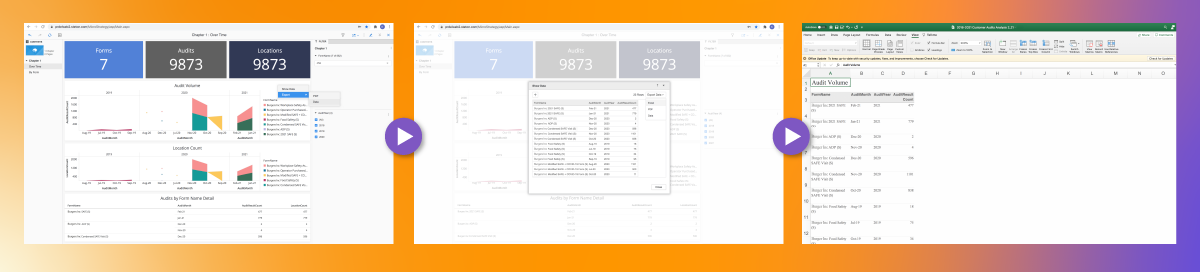
Remember, I’m not going to ask you to give up spreadsheets, but there are ways to amplify your efforts by combining spreadsheets with quality management software.
- RizePoint has the infrastructure you need to import, store, connect, and track all your data in one place. It’s fast and easy to find important information and insights, plus there’s no formulas to break. The extra great news is that you can export your data to spreadsheets at any time, so you can digest everything in the comfort of your own spreadsheet software. You can also view data in visually effective dashboards and reports in the platform, or you can use a grid view that’s very similar to a spreadsheet experience.
- Data entry almost becomes a non-issue with our world-class auditing app — Mobile Auditor. The app comes with the platform, and it can handle any data gathering you need, from complex audits to simple checklists. Mobile Auditor is fully integrated, so audit data and results are updated automatically in the system, ensuring that you’re always looking at the most up-to-date data. With a more automated system for data gathering, human error can be greatly reduced. Bonus: Auditors love our user-friendly app!
- Sophisticated reporting and analytics tools are included, so you can access daily, actionable insights via up-to-date data, and you can produce deeper reports within a few minutes in most cases. In addition to the business-specific reports and dashboards mentioned above, our ask-and-answer functionality ensures that on-demand reporting from your boss isn’t a “stop everything and work on a report for a few hours” affair; it’s a matter of asking the right questions to quickly get a complete, accurate report.
- When all your data is stored and tracked in one place, and you can import data from other sources, data management can become a background process rather than an admin activity that requires too much attention. You can easily create holistic views of your entire business, drill down all the way to a single location, or anything in between. And don’t forget, you can export to a spreadsheet whenever you need to.
Our ask-and-answer functionality ensures that on-demand reporting from your boss isn’t a “stop everything and work on a report for a few hours” affair; it’s a matter of asking the right questions to quickly get a complete, accurate report.
With more standards bodies and government entities working toward digital submission processes, and with the fallout from COVID-19, it’s clear that everyone is moving to more modernized quality management systems and programs. But you don’t have to give up quality management with spreadsheets to modernize. Pairing your well-loved spreadsheets with quality management software, like RizePoint, means you can keep the comfort of your spreadsheets while making your programs more modernized and efficient.
As president of RizePoint, Kari Hensien will never stop using spreadsheets. However, as a champion of continuous quality and modernizing quality programs, she is driven to help people keep their brand promises more efficiently in a way that is comfortable for quality managers. You can contact her at kari.hensien@rizepoint.com.

by Kari Hensien | Feb 2, 2021 | Document Management, food safety culture, Quality Management System, RizePoint, Self-Assessments, Supplier Quality Management
The world for quality management is changing dramatically. Supply chains are more complex, poor customer experiences can go viral in minutes, and COVID-19 has created a number of new potential risks and liabilities.
However, while the pandemic has surfaced new concerns, it did not cause these challenges for quality teams. Instead, they are the result of decades of technological innovation, evolving workplaces, and updated regulations.
Fortunately, these challenges are solvable. You can elevate quality and safety protocols with a few adjustments to the way you work, and to the tools that help you manage it all.
1. Make self-assessments a regular part of your quality data gathering.
Many businesses see self-assessments as something akin to an open-book test. Not technically cheating, but not as good as a test that required hours of study. We want to reframe that perception.
Increasing the frequency of self-assessments is a critical part of obtaining full visibility into your quality and safety goals. Self-assessments are not better or worse than annual or third-party assessments, simply different. They play a unique role in the quality ecosystem by helping you gather daily insights into every location.
Frequent self-assessments not only give you broader visibility, they also reinforce new or existing standards to employees. Empowering employees with knowledge and ownership of their work will help you build a continuous quality improvement model that pulls from multiple sources of data and pushes feedback directly to the places it will most make a difference.
2. Invest in software that enables data gathering and analysis.
Quality teams have struggled for years to find an effective way to compile and make sense of the data they gather. Spreadsheets have been a staple of the role since the dawn of Excel, but they don’t make it easy to collect and report on reams of data.
That is why you should look at a quality management system (QMS). A QMS makes it possible for you to keep what works for you and elevate what isn’t. If you love spreadsheets, but struggle with how disconnected they make your data, you can import the spreadsheets into a QMS and let it make the reports for you. If you want to collect more data but don’t have a way to correlate data from different sources, a QMS is built to help you do that.
If you’re ready to move into a modern quality model, you need something that will help you work better and the technology now exists to enable you.
3. Make food safety culture more than a buzzword.
It’s easy to say you want to change this or that about your culture, but it’s much harder to do so. Self-assessments will be part of helping you do that. Employees who see you care about and monitor food safety protocols are more likely to care as well.
You also need to take employee feedback seriously. Whether that comes in the form of a tipline, a self-assessment, or comments to managers, don’t brush off what employees have to say about food safety. They are the ones who see what the needs are every day. They may be able to point out improvements to the kitchen layout to reduce risk of cross contamination or tell you when a manager is ignoring proper hot and cold storage. It’s your job to listen and turn that feedback into a piece of your continuous safety and quality improvement system.
4. Make electronic updates the norm to improve consistency.
COVID-19 has exposed the weakness in antiquated paper communication with your employees. Too many companies are still using printouts that get missed by a third of employees or aren’t updated when policy changes.
You can distribute updated policies quickly and easily with digital systems. You can give employees accurate, timely updates in times of crisis or as needed, and know you have an effective communications system in place that you can rely on.
5. Modernize your vendor onboarding process.
Being able to quickly vet and onboard new vendors is a crucial to protecting your business during supply chain disruptions. During the pandemic, many companies have found themselves scrambling when key suppliers were out of critical items.
You can communicate with suppliers, avoid approval delays, and gather credentials with digital supplier management tools. All of this helps you ensure any new supplier meets your standards before becoming an approved vendor, and lets you act quickly when disruptions affect your business.
Adapting to the changing needs of quality management is a challenge, but solutions are available. You can start taking concrete steps to update how you collect, analyze, and communicate data. A quality management system will help you lay the foundation for a continuous quality management model, so you can keep what is tried and true for your team (like our beloved spreadsheets!) while getting help with the areas that give you trouble.

by Kari Hensien | Dec 23, 2019 | RizePoint, Supplier Quality Management
Tips for Finding the Right Software For Your Company
Quality management software may be designed to help you succeed in your complex job, but the task of choosing the right package for your business can be intimidating. The best choice for you and your company is going to depend on your industry, your business goals, the market, and even your individual team. There’s no one-size-fits-all solution, but don’t let that slow you down. In this article, we’ll give you actionable steps to help you select the very best quality management software vendor for your company.
1. Understand Your Needs
There’s no such thing as “the best quality management software,” only the best quality management software for you — and you can’t know what that is until you understand your specific needs. The first step, then, is to audit your current process and identify any gaps that exist in your quality management systems. Figure out where you need to improve and prioritize these areas.
2. Refer Back to Your Specific Needs, Often
Yes, you read that right: Step two is to refer back to step one. By necessity, quality management software addresses a wide variety of problems, but it’s your specific needs that you have to meet. Don’t get distracted by bells and whistles. Make sure you’re focused on the essentials, remind yourself of the specific gaps you have to fill and look for something that fits your requirements.
3. Consider All Stakeholders
You’re responsible for managing relationships with stakeholders from every level of your organization and beyond. Their happiness (and you do need to keep them happy!) will depend in large part on your ability to provide them with timely information and insight. Keep this in mind when choosing the right quality management software vendor for your business.
4. Ask Around
Quality management is an enormous field—in other words, you’re not alone. Ask your peers, including folks from any professional associations you belong to, about what they use, what problems they’re trying to solve, and whether it does the job well. Next, take your shortlist to vendor review sites. Capterra and G2 offer a treasure trove of information and reviews about quality management software vendors.
5. Request a Demo and Ask Questions
Once you’ve narrowed your search down to a few contenders, dig a bit deeper. Request demos so you can see for yourself how their products work. Ask to see use cases for organizations that are similar to yours. Your job is to advocate for your business, so come prepared and don’t be afraid to steer the conversation to your specific needs.
In the complex world of quality management software vendors, the key to finding the best software is simplicity. Keep the important things — namely, the needs of your program and its stakeholders — top of mind at all stages of your search. To streamline your evaluation process, download this self-assessment document that we designed to help you narrow down your options and focus on what matters.
Need more info about choosing a quality management system software? We have free eBook for that. Click —> here to download our “Buyer’s Guide for Quality Management System Software.”

by Kari Hensien | Dec 17, 2019 | Supplier Quality Management
Tips for Identifying & Managing Project Stakeholders
If you’ve ever managed a project, you know that key stakeholders can make or break your success.
Meeting the expectations of a single quality management stakeholder can be a job on its own, beyond all the other elements needed to make your project successful. Unfortunately, it’s rare to have only one stakeholder when you’re leading a project. It’s more likely that you’ll have several quality management stakeholders, both internal and external — from your CEO to the customer — invested in the outcome of your project.
Every added stakeholder makes your project more complex. That’s why it’s important to create a stakeholder management strategy that helps you understand and manage each stakeholder relationship, so you can effectively keep your project on target, manage expectations, and maximize your chances for success.
The first step in building a holistic stakeholder management strategy is identifying quality management stakeholders and understanding the key differences between them. This article identifies and defines internal and external project stakeholder types and offers a few tips on how to manage each one.
Note: Depending on the size and structure of your company, quality management stakeholder types may partially or completely overlap, so be sure to adjust your stakeholder management strategy to best suit your business.
Internal Quality Management Stakeholders
1. Top Management
Top management stakeholders include anyone who’s responsible for the strategy and development of your organization — from c-suite executives to department directors. Reporting to these quality management stakeholders is often highly visible, which means failed projects will also be highly visible. Additionally, these stakeholders can make or break a project based on their buy-in and commitment.
Here are a few tips for managing top management stakeholders:
- Develop detailed project plans for top management to review and approve
- Update top-level leaders when big roadblocks threaten to affect your timeline or projected outcomes
- Ask every top management stakeholder what reports they’ll need and how often you should give updates
- Put a reporting process for top management in place and stick to a standard delivery schedule
2. Direct Manager
It goes without saying that your boss dictates what your projects are and what resources are available to you in much more detail than top management. That’s why it’s essential to keep communication open and visibility high with your direct manager, so you can manage expectations and build a case for more resources as needed.
Here are a few tips for influencing your direct manager:
- Have detailed discussions about his or her expectations as well as how your performance will be measured, then document goals and timelines around those discussions
- Set regular meetings to keep your direct manager informed about project progress and challenges you encounter along the way. Make sure to bring up anything that needs direction or clarification.
- Put a reporting process for your direct manager in place and stick to a regular reporting cadence
3. Internal Customers
An internal customer can be anyone in your organization that will have final sign-off on your quality management project. Keep in mind that while you need to get buy-in and support from top management and your direct manager, they may not be the “customer” you’re serving. It’s critical to obtain as many details as possible from the internal customer and then negotiate realistic deliverables and timelines based on your resources.
Here are a few tips for managing internal customers:
- Create a detailed project brief or worksheet that helps internal customers provide the details you need to complete the project to everyone’s satisfaction
- Document every requirement and specification, then use that documentation as a written agreement for the project, and include signatures from both parties
- Include change procedures in the agreement to better negotiate requested changes to any part of the project scope or deliverables
- Understand the team culture of your internal customer and “speak their language” in your communications
- Establish that you’re the main point of contact for the project, not your team members, to keep communication clean and clear
4. Project Team
A quality management project team includes anyone who’s assigned to your project on a full- or part-time basis. This can include people from your department, borrowed members from other departments, interns, and more. They will be looking to you as a leader to communicate the value of the project, to clearly define their roles and tasks, and to support and motivate them in these efforts when needed. It’s important to create a culture of collaboration in order to support, learn, and problem-solve together.
Here are a few tips for managing your project team:
- Involve your team in the planning process to increase project buy-in and encourage members to volunteer for responsibilities that best match their strengths
- Clearly define and document the responsibilities of each team member, including relevant deadlines
- Establish that you’re available to team members whenever needed
- Set regular, short team meetings to celebrate success and solve problems
- Schedule conversational one-on-one meetings to both build rapport and address anything the team member may not want to share with the group
- Act early and decisively when you discover personality conflicts, value clashes, or other team culture challenges
5. Company Peers
Your peers include anyone who’s at the same level as you in the company, which could include a vast number of people, depending on the size of your organization. The specific peers you need to consider may be assigned to your project team or otherwise be invested in the success of your quality management project. Either way, they do not hold a leadership role in your project, nor do they have any accountability for its success. Managing peers may be highly political and hampered by personality conflicts, disparate instructions from your respective managers, or even envy that you’re the project lead instead of them.
Here are a few tips for managing company peers:
- Ask top management to make project roles clear to all project team members and emphasize that cooperation is expected from all parties
- Clearly define (and repeat often) project expectations and goals
- Have regular meetings to discuss the progress of each invested peer
- Act early if it’s clear that a peer is hampering the project in any way, such as being uncooperative or choosing gossip and bad-mouthing over moving the project forward
6. Internal Resource Managers
Aside from peers, there may be others within your organization that control resources you need, from data analysts and subject-matter experts to equipment managers and technology administrators. Fostering goodwill to build a solid working relationship with any coworker is always a good idea, but it’s a critical necessity when it comes to tackling quality management projects.
Here are a few tips for managing internal resource managers:
- Ask for access to resources for your project as soon as you know you need them. This gives resource managers enough lead time to plan and adjust schedules for other projects that require the same resources.
- Listen actively and show compassion about their workload and challenges to help foster goodwill and encourage collaboration
- Be clear and firm when communicating what you need for your project, but try to remain flexible and willing to compromise as needed
External Quality Management Stakeholders
7. Governing & Standards Bodies
If your industry is regulated in any way, you must follow specific laws, rules, and requirements to ensure your projects meet quality, safety, and compliance standards. Even if your business isn’t tightly regulated, there are likely industry best practices that help your company stay certified, relevant, and competitive in your market.
Here are high-level tips for managing the requirements of governing and standards bodies:
- Resist cutting corners, especially when it may affect the quality and safety of the product or services you deliver to external customers
- Take the time to properly document, update, and internally communicate any change to your processes. This ensures that everyone is on the same page, and it solidifies company goals and values. Additionally, if you’ve documented procedural changes,you’re more likely to be prepared (instead of scrambling) when any internal or external audit, inspection, or assessment occurs
8. Suppliers, Vendors & Contractors
When internal resources can’t cover your needs, you will need to hire outside help. Depending on your project, this could be anything from consulting with an industry expert to hiring a graphic designer. Keep in mind: No matter how well you communicate with external resources, the risks are higher when it comes to managing work quality, staying within budget, and meeting critical deadlines.
Here are tips for managing project suppliers, vendors, and contractors:
- Document every requirement and deliverable in the signed contract; never rely on spoken promises or goodwill
- Schedule frequent meetings to check on their progress
- Make it clear that you need to hear about any roadblocks or issues as soon as they arise, so you can help keep the project on track.
- Refer also to the tips for managing peers and internal resource managers above.
9. External Customers
Last, but certainly not least, are external customers. These are the people that will ultimately be consuming your company’s product or services. External customers are arguably the most important stakeholder for you and your business. Avoiding bad press, creating positive experiences through safe and quality products, increasing customer retention, and gaining new customers are all examples of success that drives revenue.
Here are a few tips for managing external customers:
- Always keep your customer in mind when managing a quality management project
- Remind other internal stakeholders about customer needs when planning and negotiating project details
- Remember that successfully managing your quality management projects and all internal stakeholders is what helps you keep brand promises to your customers
With careful consideration, you can create a plan that helps your quality management stakeholders stay appropriately involved and invested in your project, which helps you keep it running smoothly while increasing your chances of success.
Learn more about creating an effective stakeholder management strategy in this article: Every Quality Professional Needs a Stakeholder Management Strategy.
RizePoint offers quality management software that empowers quality leaders to collect, organize, and manage data around their quality assurance and supplier quality management programs, so they can deliver consistent, safe, and quality products and services. Click here to learn more today.

by Kari Hensien | Nov 21, 2019 | Supplier Quality Management
Your organization works with many suppliers and vendors. And if you’re manually managing supplier quality, chances are noncompliances are hiding in your data and leaving you open to risks.
You’re searching through long email chains, deep folder structures, and complex spreadsheets to gain insights, which means you have murky visibility at best. Plus manual systems involve too many administrative tasks, so you’re short on time to drive important quality initiatives that improve the quality and safety of your products and services.
If you find yourself lost in a sea of documents and spending too many hours a week with administrative tasks, it might be time to embrace supplier quality management software.
Here are 10 more signs that it’s time to ditch manual processes and start using software to manage supplier quality.
1. Your Team Spends Too Many Hours Collecting Docs
With supplier quality management (SQM) software, suppliers use clear task lists to answer questions and upload documents, which are then automatically associated with the right locations, products, or materials.
2. Supplier Communication is Increasingly Difficult & Frustrating
Sending and tracking supplier tasks and compliance document requests all in one place improves supplier relationships and adds transparency for you and your suppliers.
3. You Dread Requests for Reporting Updates
A single source of truth for compliance statuses and searchable data means you can find answers in minutes for both planned and ad-hoc reporting.
4. Better Visibility Sounds Like a Far Away Dream
Instead of searching error-prone spreadsheets, see all your supplier qualification and compliance statuses in a single view and drill down into noncompliances with just a few clicks.
5. Key Info Is Buried in Long Email Threads
The phrase “I know it’s in here somewhere” won’t be in your vocabulary when everything you need is stored and organized as a single source of truth.
6. “Losing” Data or Supplier Documents is the Norm
The looming enemy of deep folder structures will be a thing of the past when you use the right software to manage suppliers, helping you ditch manual document management and data management via spreadsheets.
7. It Feels Like Your Job is Mostly Administrative Work
You’ll no longer sort through submitted docs, search for expiration dates, be blindsided by yearly renewals, or send dozens of emails to suppliers a day (that, let’s face it, go unanswered.)
8. Optimizing Strategy is Often on the Back Burner
The time saved through automating administrative work can be used to focus on strategy for important quality, safety, and compliance initiatives.
9. Data is Only Available When it’s Too Late
Get quick and easy access to the most up-to-date data and stop acting on old data, which often leads to redoing work.
10. You Can Only Access Data When You’re at Your Desk
Using cloud-based software to manage suppliers means you can access your information wherever you have an internet connection on your phone, tablet, or laptop.
See how RizePoint can help you solve all these problems and more with an easy, affordable supplier quality management solution for supplier onboarding and ongoing supplier compliance. Request a demo today.
